Try It On: Bringing the In-Store Watch Experience Online
Watch Retailer, United States
Custom Feature Development
2026
Shopify Development
Project Overview
Buying a watch online often comes down to guesswork. Product photography can show the dial, case and strap in detail, but it rarely answers the question that matters most to the buyer: How will this watch actually look on my wrist?
Try It On Wrist was built to close that gap.
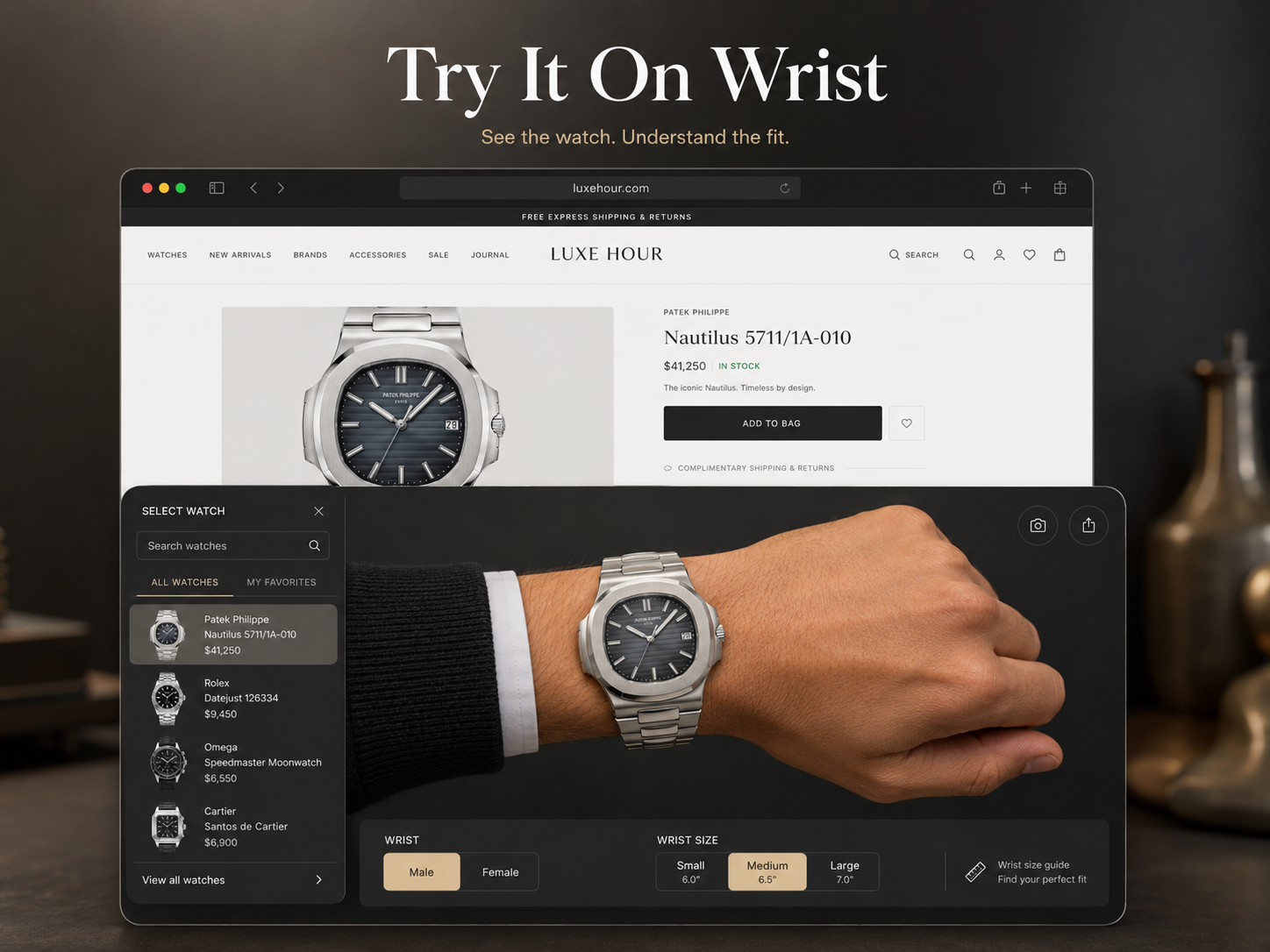
The experience allows shoppers to preview selected watches on a realistic wrist before adding them to their cart. Customers can switch between male and female wrist models, choose a wrist size and immediately see how the watch case sits in proportion to the hand.
Instead of applying one generic watch image across every product, the system uses model-specific dimensions and positioning rules. Round, rectangular and differently sized cases are adjusted individually, helping each preview feel more believable and visually balanced.
The feature is integrated directly into the Shopify storefront, so customers can explore it without leaving the product journey or opening a separate application.
Key capabilities
Realistic Wrist Preview
Places the selected watch over a natural wrist image to give shoppers a clearer sense of scale and appearance.
Male and Female Wrist Options
Customers can switch between different wrist models based on their preferred fit and viewing experience.
Multiple Wrist Sizes
The interface supports several wrist-size options, allowing the watch to scale more accurately for different users.
Model-Specific Watch Sizing
Each eligible watch can be assigned its actual case dimensions rather than relying on a universal visual size.
Support for Different Case Shapes
Custom rules account for round, square and rectangular watch designs, including individual positioning adjustments.
Shopify Product Integration
Watch data, product images and model references are connected to the existing Shopify catalogue.
Preconfigured and Searchable Models
Featured products can be configured in advance, while additional supported watches can be loaded through the search experience.
Technical approach
The experience was developed as a custom storefront feature using Shopify Liquid, JavaScript and product configuration data.
Each supported watch model is mapped to its dimensions, case shape and preferred wrist type. The rendering logic then calculates the appropriate scale and placement based on the selected wrist model and size.
Separate adjustment profiles were created for male and female wrists so the watch does not simply become larger or smaller—it remains positioned naturally as the wrist changes.
The system was also designed to support product-specific exceptions, which is important for rectangular cases and watches with unusual proportions.
The challenge behind the build
The difficult part was not placing a watch image over a hand. It was making hundreds of different case sizes and shapes look consistent without manually rebuilding the experience for every product.
The solution uses reusable sizing rules alongside product-level configuration. This gives the retailer control over individual models while keeping the overall system practical to manage as the catalogue grows.
Outcome
Try It On Wrist gives online shoppers a more confident way to evaluate a watch before purchasing. It turns a static product page into an interactive buying experience and brings an important part of the showroom decision process into the ecommerce journey.
For the retailer, the feature creates a stronger product presentation without requiring 3D modelling or a dedicated mobile application for every watch.